



Скриншот архива с проектом
Прикрепите скриншот архива с проектом, чтобы клиент видел, какие файлы он получит.
Структура проекта
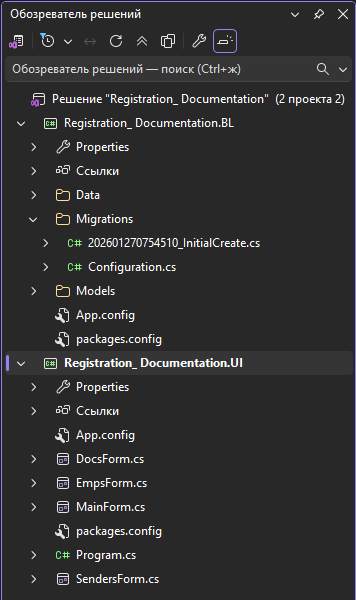
Задание
Разработать приложение отвечающее требованиям - среда разработки Visual Studio 2026, Язык программирования - C# Windows Forms и база данных SQL Server.
Функционал программы
- Создание и учет сотрудников(полный CRUD )
- Создание и учет отправителей (полный CRUD)
- Учет входящей документации ( полный CRUD)
Фрагмент программного кода
using Registration__Documentation.BL.Data;
using Registration__Documentation.BL.Models;
using System;
using System.Collections.Generic;
using System.ComponentModel;
using System.Linq;
using System.Windows.Forms;

namespace Registration__Documentation.UI
{
    public partial class DocsForm : Form
    {
        private AppDbContext context;
        private List<Document> documents = new List<Document>();
        private BindingSource docsBindingSource = new BindingSource();
        private BindingSource displayBindingSource = new BindingSource();
        public DocsForm()
        {
            InitializeComponent();
            context = new AppDbContext();
        }

        private void Populate()
        {
            documents = context.Documents
                .Include("Sender")
                .Include("Employee")
                .ToList();

            docsBindingSource.DataSource = new BindingList<Document>(documents);


            var displayData = documents.Select(d => new
            {
                d.DocumentId,
                d.RegNumber,
                RegistrationDate = d.RegistrationDate.ToString("dd.MM.yyyy"),
                d.Description,
                d.DocumentType,
                SenderName = $"{d.Sender.Supervisor_FullName}",
                EmployeeName = $"{d.Employee.Surname} {d.Employee.Name}",

            }).ToList();

            displayBindingSource.DataSource = displayData;

            DocumentsDGV.DataSource = null;
            DocumentsDGV.Columns.Clear();
            DocumentsDGV.DataSource = displayBindingSource;

            bindingNavigator1.BindingSource = displayBindingSource;
        }

        private void DocsForm_Load(object sender, EventArgs e)
        {
            Populate();
            docsBindingSource.CurrentChanged += DocsBindingSource_CurrentChanged;

            // Загрузка отправителей
            var senders = context.Senders.ToList();
            SenderCb.DataSource = senders;
            SenderCb.DisplayMember = "Supervisor_FullName";
            SenderCb.ValueMember = "SenderId";

            // Загрузка сотрудников
            var emps = context.Employees.ToList();
            EmployeeCb.DataSource = emps;
            EmployeeCb.DisplayMember = "FullName";
            EmployeeCb.ValueMember = "EmployeeId";
        }

        private void DocsBindingSource_CurrentChanged(object sender, EventArgs e)
        {
            if (docsBindingSource.Current is Document selectedDocument)
            {
                RegNumberTb.Text = selectedDocument.RegNumber;
                RegDateDtp.Value = selectedDocument.RegistrationDate;
                DescRtb.Text = selectedDocument.Description;
                DocTypeCb.SelectedItem = selectedDocument.DocumentType;
                // Устанавливаем студента и администратора
                SenderCb.SelectedValue = selectedDocument.SenderId;
                EmployeeCb.SelectedValue = selectedDocument.EmployeeId;
            }
        }

        private void AddBtn_Click(object sender, EventArgs e)
        {
            if (SenderCb.SelectedValue == null || EmployeeCb.SelectedValue == null)
            {
                MessageBox.Show("Пожалуйста, выберите отправителя и сотрудника.");
                return;
            }

            int senderId = (int)SenderCb.SelectedValue;
            int empId = (int)EmployeeCb.SelectedValue;


            var document = new Document
            {
                RegNumber = RegNumberTb.Text,
                RegistrationDate = DateTime.UtcNow,
                Description = DescRtb.Text,
                DocumentType = DocTypeCb.SelectedItem.ToString(),
                SenderId = senderId,
                EmployeeId = empId,
            };

            context.Documents.Add(document);
            context.SaveChanges();

            MessageBox.Show("Запись успешно добавлена.");
            Populate();
        }

        private void EditBtn_Click(object sender, EventArgs e)
        {
            var current = docsBindingSource.Current as Document;
            if (current == null)
            {
                MessageBox.Show("Выберите запись для редактирования.");
                return;
            }

            var document = context.Documents
                .FirstOrDefault(en => en.DocumentId == current.DocumentId);

            if (document == null)
            {
                MessageBox.Show("Запись не найдена.");
                return;
            }

            document.RegNumber = RegNumberTb.Text;
            document.RegistrationDate = RegDateDtp.Value;
            document.Description = DescRtb.Text;
            document.DocumentType = DocTypeCb.SelectedItem.ToString();
            document.SenderId = (int)SenderCb.SelectedValue;
            document.EmployeeId = (int)EmployeeCb.SelectedValue;

            context.SaveChanges();
            MessageBox.Show("Запись обновлена.");
            Populate();
        }

        private void DeleteBtn_Click(object sender, EventArgs e)
        {
            var current = docsBindingSource.Current as Document;
            if (current == null)
            {
                MessageBox.Show("Выберите запись для удаления.");
                return;
            }

            var confirm = MessageBox.Show("Удалить запись?", "Подтверждение", MessageBoxButtons.YesNo);
            if (confirm != DialogResult.Yes)
                return;

            var document = context.Documents
                .FirstOrDefault(en => en.DocumentId == current.DocumentId);

            if (document != null)
            {
                context.Documents.Remove(document);
                context.SaveChanges();
                MessageBox.Show("Запись удалена.");
                Populate();
            }
        }

        private void ClosedBtn_Click(object sender, EventArgs e)
        {
            Close();
        }

        private void DocumentsDGV_CellClick(object sender, DataGridViewCellEventArgs e)
        {
            if (e.RowIndex >= 0 && e.RowIndex < documents.Count)
            {
                docsBindingSource.Position = e.RowIndex;
                DocsBindingSource_CurrentChanged(null, null);
            }
        }
    }
}
Пояснения по запуску программы
Вместе с приложением идет подробная инструкция. Выполняем строго все так как написано и проблем с запуском и рабой с приложением не возникнет.
 Телеграм

-